The binder problem
In most engine rooms the maintenance history is real, thorough, and almost impossible to use. It lives in a row of lever-arch binders, a shared drive of scans named Scan_0047.pdf, a spreadsheet that one departed chief understood, and a planned-maintenance system that records that a task was done but not what it took to do it. The information exists. Finding the right piece of it, on the day you need it, is the labour.
A vessel's record is only as valuable as the speed at which the next person can retrieve a specific fact from it — and a binder fails that test, as does a folder of scans, because a scan of a service report is a picture of text, not text you can search. The question that matters at a survey, a breakdown, or a crew change is not "do we have the record" but "can the person who needs it find it before the technician's callout clock starts."
This is not a niche state. Industry surveys of yacht maintenance practice still find heavy reliance on paper logs and spreadsheets, particularly for the operational detail that never reaches the formal planned-maintenance system [1]. Paper is durable and familiar; it is also unsearchable, un-backed-up, and tied to whoever filed it.
Why "scanning it all" is not digitizing
The first instinct — scan every binder to PDF and call it done — solves the wrong problem. A drive of image-only PDFs is no more findable than the binders were; it is the same haystack, now without the physical tabs that told you which volume to open. A digitized record is three things a digital pile is not: text you can search, not pictures of text; connected to the equipment, fault, and part each record relates to; and retrievable in plain language by an engineer who knows the symptom but not your filing convention.
How to digitize yacht maintenance records: a practical sequence
The work divides into a clear order. None of it requires throwing away the system you already trust — the point is to make the record findable, not to re-key a decade of history by hand.
- Inventory what you actually have. List the sources before touching any of them: the binders, the scan drive, the spreadsheets, the planned-maintenance export, and — easily forgotten — the email threads with suppliers, which often hold quotes and diagnoses that exist nowhere else.
- Scan paper to text, not just to image. Run the scans through text recognition so the words inside become searchable. A searchable PDF is worth ten image-only ones. Keep the originals; you are adding a searchable layer, not discarding the paper trail.
- Keep your formats as they are. Do not stop to reformat everything into one template — that project never finishes. Existing manuals, PDFs, scans, exports, and emails should be indexed as they are. The reformatting exercise is what kills most digitization efforts before they deliver anything.
- Restore the connections. A flat archive is searchable but still dumb. The step that turns files into memory is linking each record to the equipment, fault, work order, and part it relates to, so following one leads to the rest.
- Make it answerable in plain language. The final test is whether someone who has never worked the boat can type a symptom and reach the right record. If retrieval still depends on knowing the filing system, the migration has not landed.
Steps one through three you can do with a scanner and discipline. Four and five are where most paper-to-PDF projects stall — a folder of searchable files still has no idea that this fault and that work order are the same story. That is the gap a record system closes.
The payoff: search that returns the record, not a snippet
Here is the difference a real migration makes, in one moment. An engineer types oil — the way they'd ask a colleague — and the results come back grouped by where they live: the engine-room oil leak under Faults, the oil filter stock under Inventory, the oil-change procedure from the machinery manual under Documents. Each row carries the record reference, and one click opens the source record itself, not a preview of it.
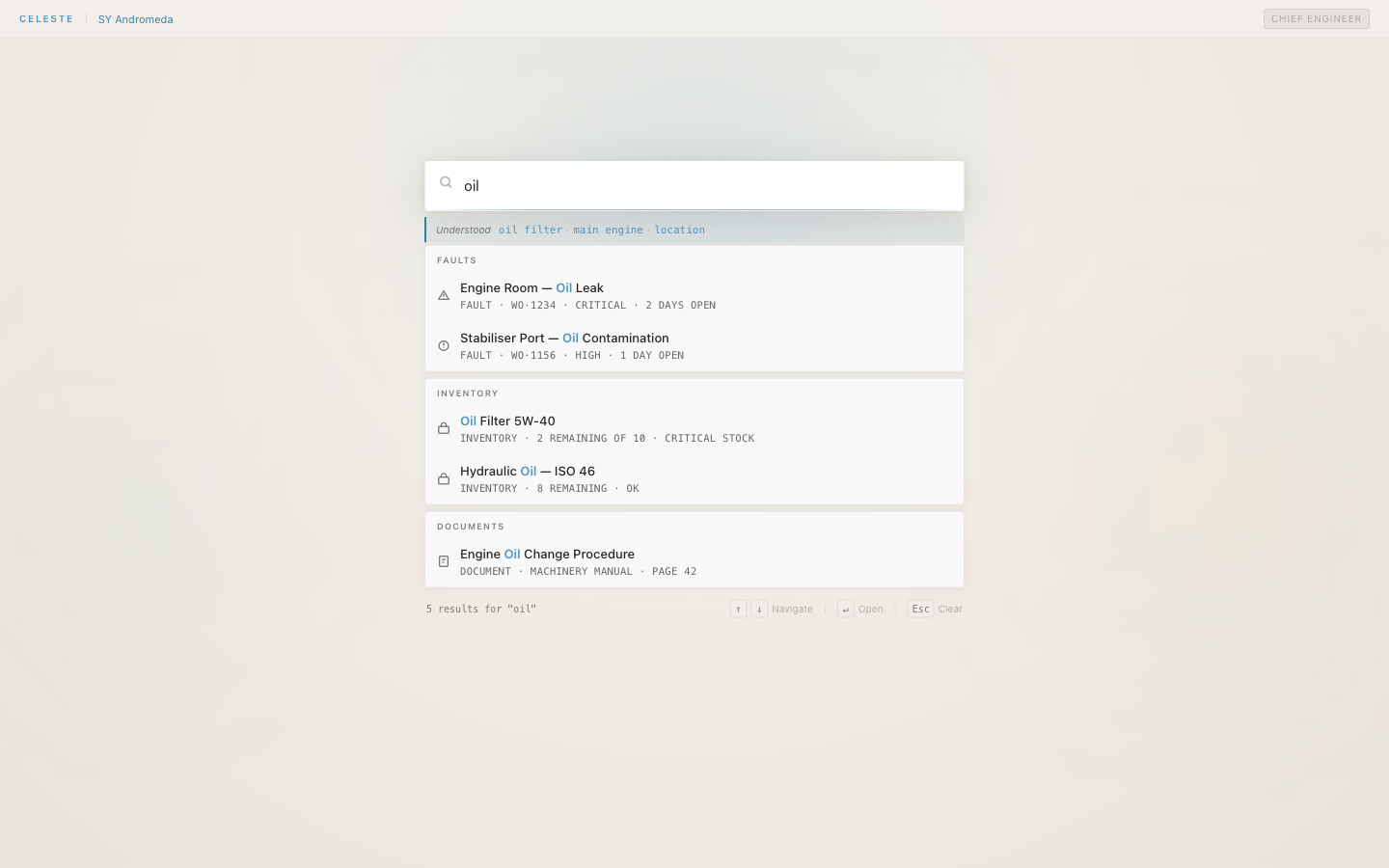
That is the line worth holding onto when you plan a digitization project: search returns the record, not a snippet. Natural-language search across your vessel's records and manuals means the incoming engineer finds what they mean, not what they typed — results scoped to your vessel and role, with no filter to set up first, and the knowledge of where things were filed no longer a prerequisite for finding anything.
Connected records, not loose files
A searchable archive answers the question you thought to ask; a connected record answers the one you didn't. Open a fault — a port fuel isolation valve leak — and what's related surfaces alongside it: the work order that addressed it, the equipment it sits on, the warranty claim it fed. The corrective-action story is on the record itself, so the engineer who inherited the boat follows one thread to every connected record, without leaving the page.
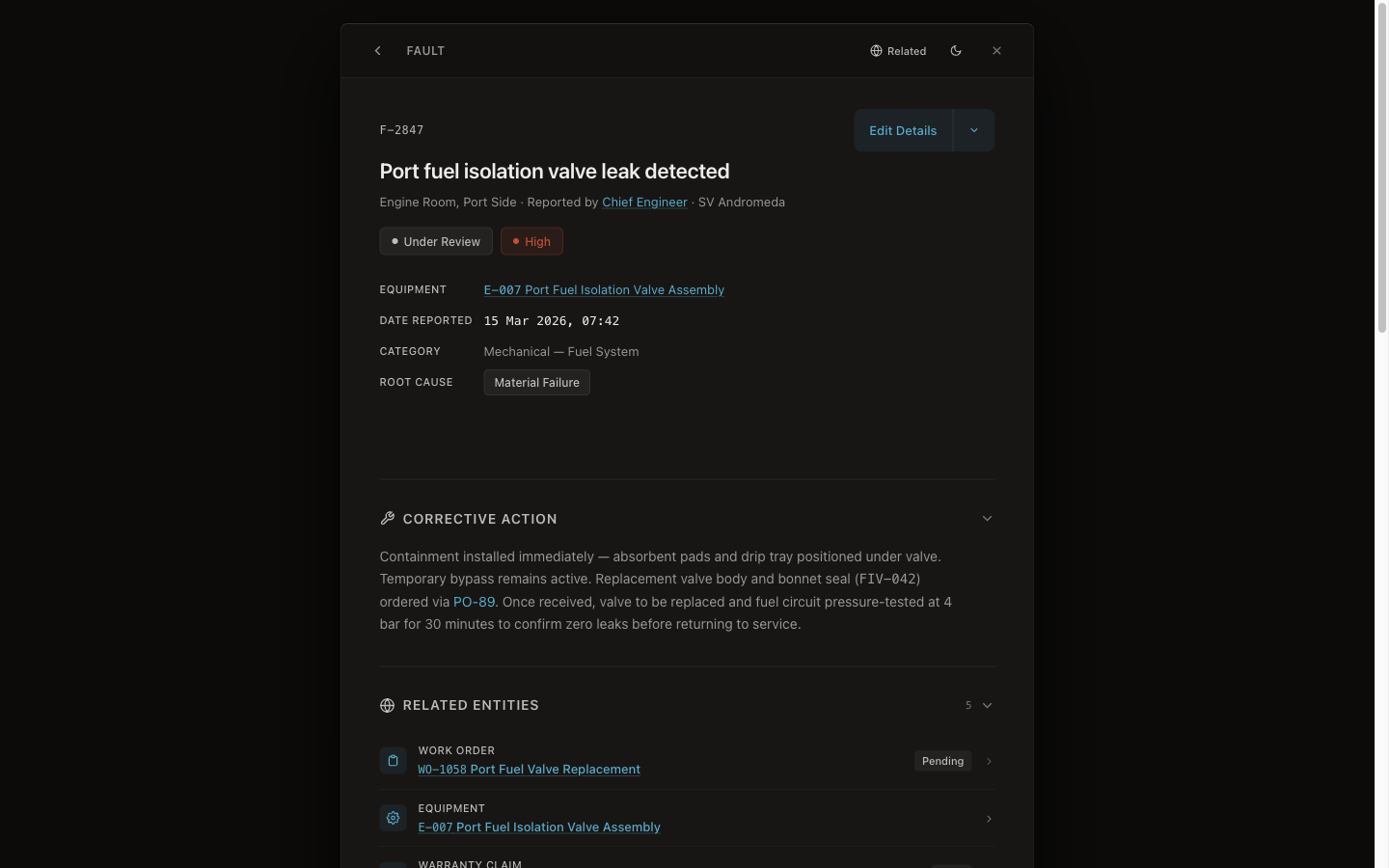
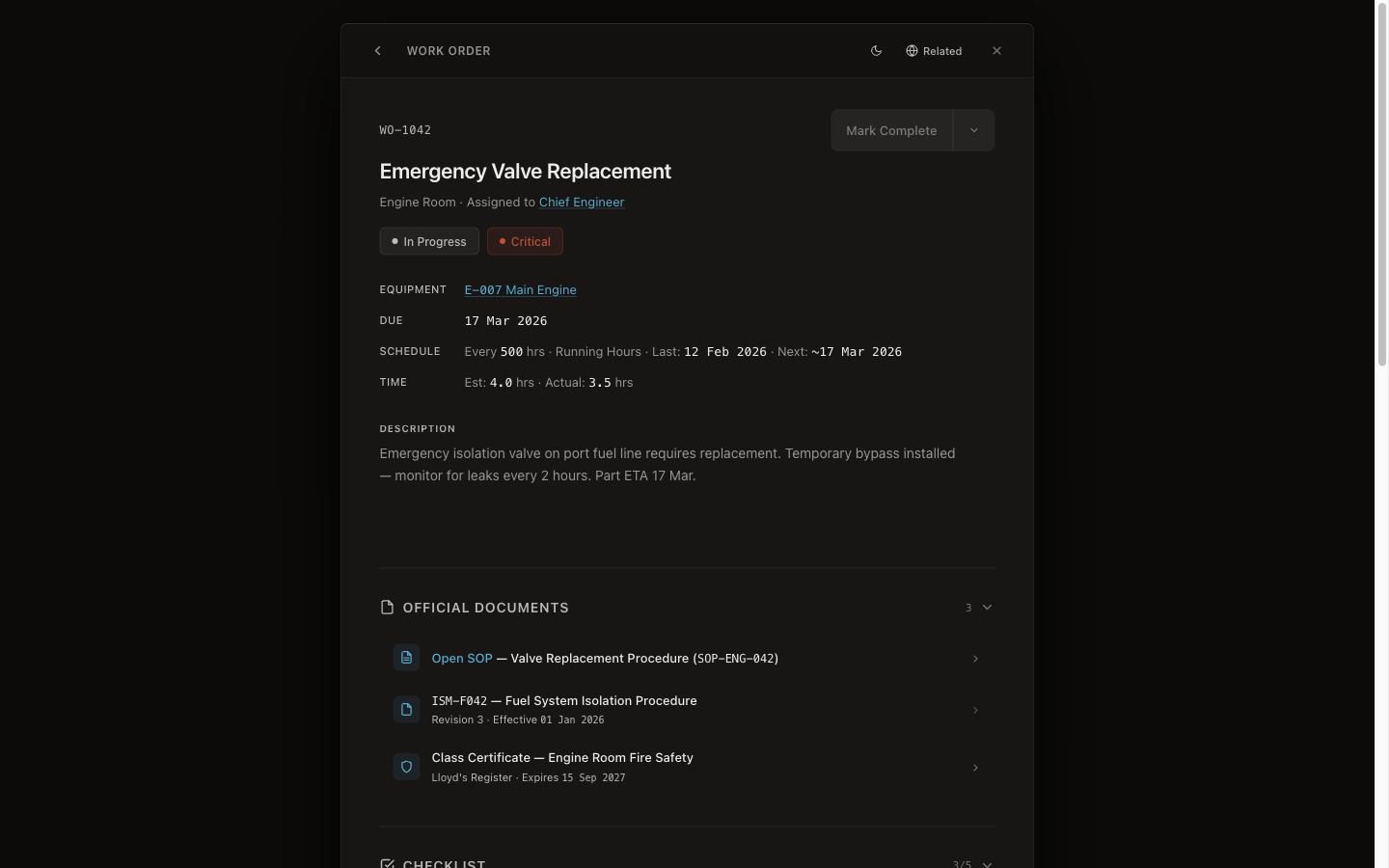
This is what scanning alone can never give you. A PDF of a service report is an island; the same report, connected to the equipment, the fault, and the part, is the difference between a filing cabinet and a memory. The work order carries its own paperwork too — the SOP, the ISM procedure, the class certificate — attached to the record rather than scattered across a drive, so the document you need to show an inspector is on the job.
The record has to survive the crew, and the audit
A digitization project has a second job beyond findability: the record has to hold up later, when crew have rotated and someone asks who did what. The ISM Code already requires vessels to keep records of maintenance activity and to inspect equipment at appropriate intervals [2] — but that is a documentation minimum, requiring that records exist, not that they be searchable or transferable. A migration that only produces a searchable pile has met the letter and missed the point.
The record that survives is attributed and unalterable. Every action — logging a fault, creating a work order, signing off a job — is attributed by signed-in user and role, and timestamped, and the trail is append-only: nothing is overwritten, corrections reference the original, and the original remains intact. That turns a vessel's history into evidence rather than an assertion — which is what a flag-state or Port State Control inspection is really testing, and how an append-only audit trail holds up under it. The cost of getting it wrong is concrete: when the record cannot be found, the next engineer pays a marine technician to re-diagnose a fault the vessel already solved once [3]. The point of digitizing is not neatness; it is that the boat stops paying twice to learn what it already knew.
Where the product fits
This is the stage where most migrations need more than a scanner. CelesteOS runs alongside your existing planned-maintenance system — nothing to replace, nothing to migrate away from. Your existing manuals, PDFs, scans, exports, and emails are indexed as they are, with no reformatting exercises; the vessel's record becomes searchable as soon as import completes, and onboarding is measured in days, not months. The judgement still belongs to the engineer — what changes is that the by-product of years of normal work stays with the vessel, connected and findable, instead of evaporating when a binder is lost or a chief boards a flight home. Every record CelesteOS holds is independently verifiable at verifier.celeste7.ai, and for the wider stakes, see what walks off the boat when a chief engineer rotates.
Frequently asked questions
What does it mean to digitize yacht maintenance records properly?
Three things, not one. The records have to be text you can search, not pictures of text; connected to the equipment, faults, and work orders they relate to; and retrievable by a plain-language question rather than knowing the filing convention. A drive of image-only scans meets none of these — it is the binder problem with the tabs removed.
Do I have to re-type or reformat everything to make it searchable?
No, and trying to is what stalls most projects. Existing manuals, PDFs, scans, exports, and emails should be indexed in their current formats; scanning paper through text recognition adds a searchable layer without discarding the originals. The reformatting exercise — forcing a decade of mixed records into one template by hand — is the step to avoid, not the step to start with.
Can I keep my existing planned-maintenance system?
Yes. A searchable record layer runs alongside the certified planned-maintenance system rather than replacing it — nothing to migrate away from, and the PMS keeps its class society approvals, its workflows, and its crew familiarity. The aim is to make the vessel's full history findable, not to rip out a system the crew already trusts.
Why isn't a folder of scanned PDFs enough?
Because a scan is a picture of text. You can only find a file in that folder if you already know its name or where it sits — precisely the knowledge that leaves with the engineer who filed it. Digitizing properly means the contents are searchable, the records are connected to each other, and a plain question returns the source record rather than a snippet you then have to chase.
Summary
- A scanned binder is not a digitized record; an image-only PDF is no more findable than the paper was.
- Proper digitization is three things: searchable text, records connected to each other, and retrieval in plain language by someone who doesn't know your filing system.
- The sequence: inventory the sources, scan paper to text, keep existing formats, restore the connections, then make it answerable in plain language — and skip the reformatting exercise that stalls most efforts.
- The payoff is search that returns the actual record, related records one click away, and an append-only trail that survives both the crew change and the inspection.
CelesteOS makes a superyacht's existing records — manuals, scans, exports, faults, and work orders — searchable in plain language and connected to each other, so the history stays with the vessel. Learn about the pilot.
[1] Seahub, "Why Yacht Maintenance Software Beats Spreadsheets and Paper Logs" — seahubsoftware.com
[2] IMO, International Safety Management (ISM) Code, Section 10 — marineinsight.com
[3] Boat International, "The hidden costs of owning a yacht" — boatinternational.com