The real problem isn't filing — it's finding
Every vessel arrives with a wall of documentation: machinery manuals, OEM service bulletins, wiring schematics, watermaker procedures, scanned warranty cards, class certificates, and a decade of email threads with manufacturers. Most of it is filed somewhere. Almost none of it is findable at the moment something fails.
The reason is structural. A folder tree only works for the person who built it, and that person rotates off the boat. Files get named by whoever saved them — "GEN-2-manual-FINAL-v3.pdf" made perfect sense to the last engineer and is a guessing game for the next one. A 2026 Seahub survey of yacht engineers found that 66% of engineering handovers last a week or less [1] — nowhere near enough time to walk a successor through where every document lives.
The ISM Code requires a vessel to keep records of its maintenance and to inspect equipment at appropriate intervals [2]. It does not require those records to be searchable, connected, or transferable to the next crew. That gap — between a document existing and a document being findable — is the entire problem, and no amount of re-foldering closes it.
How to organize yacht manuals onboard, step by step
The method that survives a rotation inverts the usual instinct. Instead of sorting manuals into the perfect hierarchy, you make the hierarchy irrelevant — by indexing what's inside each document and tying it to the equipment it describes. The folder becomes something you never have to maintain again.
- Gather everything as it is. Pull every manual, PDF, scan, OEM email, and exported report into one place without renaming or reformatting anything. Your existing manuals, PDFs, scans, exports, and emails can be indexed as they are — no reformatting exercises, no migration marathon before the work pays off.
- Index by content, not by filename. A document should be findable by what it contains — an oil-change procedure, an impeller replacement, a SOLAS expiry — rather than by whether someone remembered to name the file sensibly. Indexing by content finds the manual even when nobody remembers the filename.
- Connect each manual to the equipment it describes. A watermaker procedure belongs on the watermaker record, not three folders away from it. Documents connected to the work they describe are the ones the next engineer actually reaches for.
- Put one search at the top of every screen. The incoming engineer should be able to type what they'd ask a colleague and land on the right page — from the bridge, the engine room, or a phone in the tender. A search bar that lives at the top of every screen — phone, tablet, laptop — beats any folder map ever drawn.
- Keep a person in the loop on every link. When a manual looks like it matches a piece of equipment, an engineer confirms or declines it. The system proposes; the engineer decides. Nothing gets filed against the wrong machine because something guessed.
The first four steps are organising principles you can adopt with almost any toolset. The fifth is the discipline that keeps the result trustworthy: a human stays the authority on what belongs where.
Connect the manual to the equipment, not the folder
This is the part most filing systems get backwards, and it is where CelesteOS does its quiet work. Rather than asking you to remember which folder holds the generator manual, the right manual surfaces on the equipment card itself. Suggested documents appear with a match score, matched by content and metadata; the engineer accepts or denies with one tap. Accept links the document to the record in front of you. Deny is per-record. Every accept and every deny is recorded.
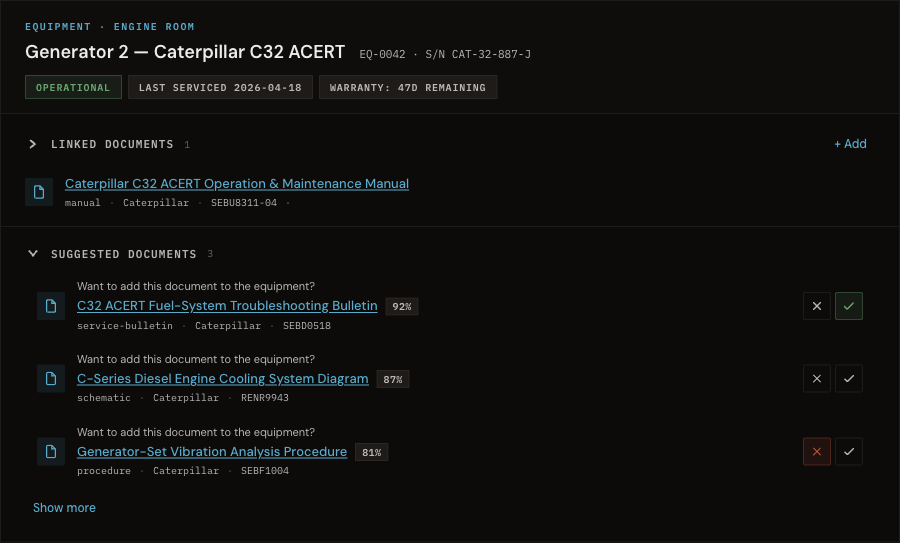
The effect is that the manual stops being a file you go looking for and becomes a property of the thing it describes. Open the generator and its bulletins are there. Open a fault and the procedure that resolves it is one click away — because a person, not a guess, put it there.
Search the manuals the way you'd ask a colleague
Once manuals are indexed by content and tied to their equipment, organising them stops being a task you maintain. You no longer browse to a manual; you ask for what's inside it. Natural-language search runs across the vessel's records and manuals — you type what you'd ask a colleague, and the result is the record itself, not a snippet of it.
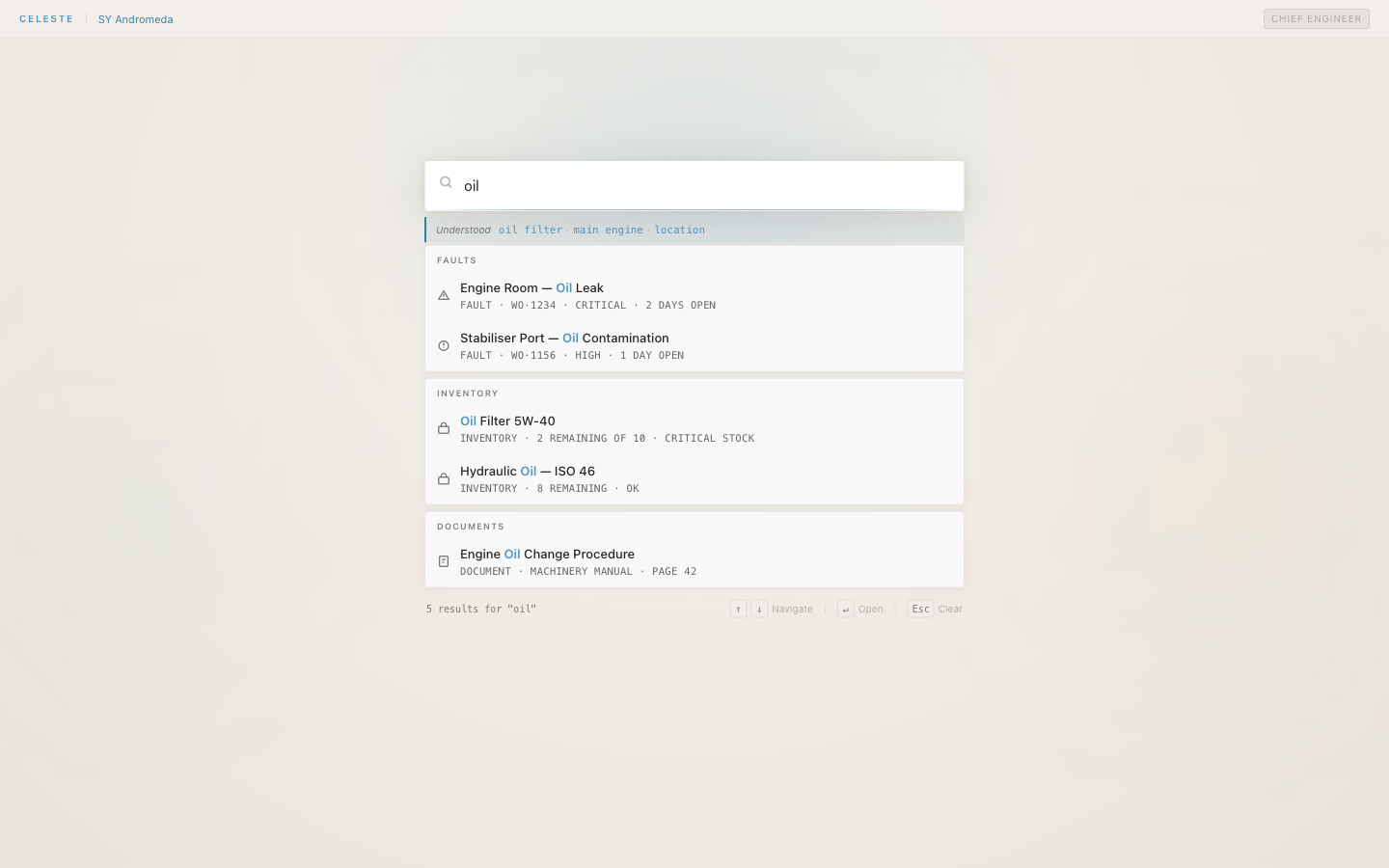
Search "oil" and the answer comes back grouped — the engine-room oil-leak fault, the oil-filter stock level, and the oil-change procedure from the machinery manual — each one a live record you open in a single click. Search returns the record, not a snippet. There is nothing to learn: the engineer types what they need, and results are scoped to the vessel and role, with no filter to set up first.
The organisation that holds when the crew rotates
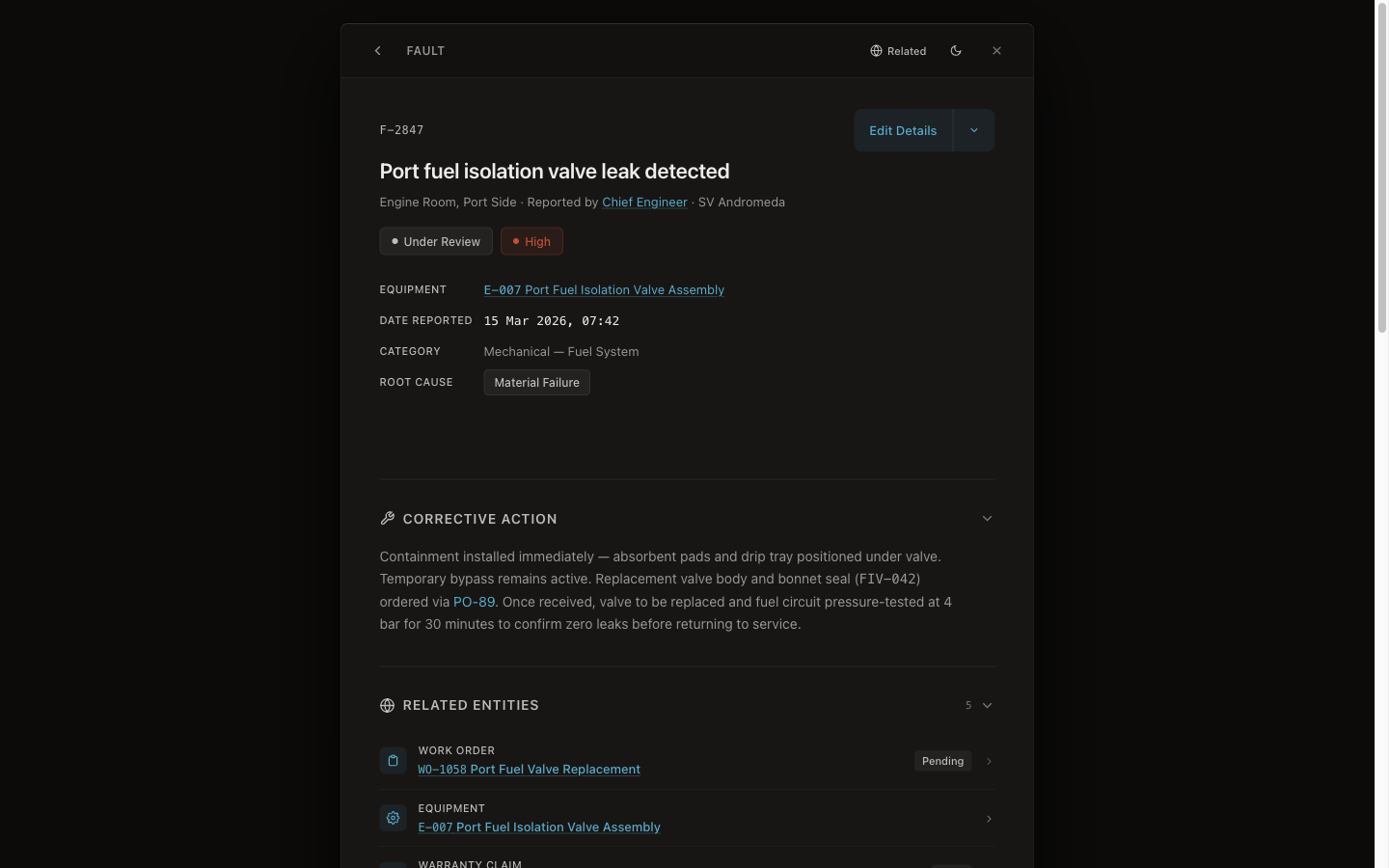
An index is only worth building if it survives the next handover. Because every manual is tied to a record rather than to one engineer's folder logic, the connections hold after that engineer flies home. Open a fault and what's related surfaces alongside it — the work order, the equipment, and the manual cited in the diagnosis — so whoever inherited the boat can follow one thread to every connected record without knowing where anything was filed.
CelesteOS runs alongside your existing planned-maintenance system — nothing to replace, nothing to migrate — so the manuals you already hold keep working while they become findable. Every link an engineer makes is attributed and timestamped, and the records are independently verifiable at verifier.celeste7.ai. The judgement stays with the engineer; the organised record stays with the vessel. For the wider cost of letting that knowledge leave on the next flight, see our piece on crew turnover and knowledge loss.
Frequently asked questions
How should yacht manuals be organised so the next crew can find them?
Stop perfecting the folder tree and start indexing by content. Pull every manual into one place as it is, make each document findable by what it contains rather than its filename, and tie it to the equipment it describes. The incoming engineer then searches in plain language instead of guessing how the last crew filed things.
Do I need to rename or reformat all the manuals first?
No. Your existing manuals, PDFs, scans, exports, and emails are indexed as they are — there is no reformatting exercise and no renaming marathon to complete before the work becomes useful. The index does the finding; the files stay as you received them.
What's the fastest way to find a specific procedure during a breakdown?
Type what you'd ask a colleague — "watermaker membrane flush", "port generator overheat" — into a search bar that sits at the top of every screen. The result is the live record, not a snippet, so you land on the actual procedure, fault, or part rather than a search-results page to wade through.
Does this replace our planned-maintenance system?
No. CelesteOS runs alongside your existing PMS — nothing to replace, nothing to migrate. The PMS keeps its workflows and its crew familiarity; CelesteOS makes the documentation around it findable and keeps each manual connected to the work it describes.
Summary
- Organising yacht manuals is a findability problem, not a filing one — a folder tree only works for the person who built it, and that person rotates off.
- Index manuals by content and tie each one to the equipment it describes, so the right document surfaces on the record instead of being hunted down a folder path.
- Gather everything as it is — no renaming, no reformatting — and let search by content find the manual even when nobody remembers the filename.
- Keep a person in the loop: the system proposes a match, the engineer accepts or declines, and the link is recorded.
- Done this way, the organisation survives the next handover, because it is tied to the vessel rather than to one engineer's memory.
CelesteOS keeps a superyacht's manuals and records findable in plain language, connected to the equipment they describe, so the right page is there when it matters. Learn about the pilot.
[1] Seahub, "Superyacht Engineering Handover: Good, Bad or Essential?" — seahubsoftware.com
[2] IMO, International Safety Management (ISM) Code, Section 10 — marineinsight.com