Start with the spreadsheet. It is the correct first move.
There is a particular snobbery in marine software circles about the engineer who runs a vessel on a spreadsheet. Ignore it. A maintenance log in Excel or Google Sheets is free, it needs no training, it opens at anchor with no connection at all, and it is fully under your control. For a single vessel with one engineer who knows where everything is, it can carry the load for a long time. Most planned-maintenance deployments start here, and a well-built sheet beats an expensive system nobody opens.
So before anything else, here is a structure you can copy into a blank workbook today. No download, no sign-up — the value of a template is the columns it forces you to keep, and those are below in plain text.
The yacht maintenance log template, tab by tab
A maintenance log that survives contact with a real engine room is not one flat list. It is a small set of linked tabs, each answering one question. Build these five and you have covered most of what a basic planned-maintenance system does.
Tab 1 — Equipment register
The backbone. One row per item of equipment, each with a stable ID you will reference everywhere else.
- Equipment ID — a short code you invent (e.g. GEN-1, ME-PORT). This is the key everything links back to.
- Description, Manufacturer, Model, Serial number.
- Location on board — engine room, lazarette, bridge.
- Running hours source — where you read the hours (counter, log).
- Manual reference — the filename or folder of the OEM manual, so you can find it later.
Tab 2 — Planned maintenance schedule
What is due, and when. One row per recurring task, linked to an Equipment ID.
- Equipment ID (matches Tab 1), Task description.
- Interval — by running hours or by calendar (e.g. every 500 h, or annually).
- Last done (date / hours) and Next due (date / hours).
- Status — a column you colour by hand: due, overdue, done.
Tab 3 — Work and fault log
What actually happened. One row per completed job or logged fault — the historical record that becomes the most valuable tab over time.
- Date, Equipment ID, Type (planned, breakdown, inspection).
- What was found and what was done — the narrative, in full sentences. This is the part you will be glad you wrote.
- Parts used, hours spent, who did it.
Tab 4 — Parts and inventory
What is on board and where. One row per part.
- Part number, description, linked Equipment ID.
- Quantity on board, minimum stock, physical location (locker, shelf, box).
- Supplier and lead time — the knowledge that saves a six-week wait.
Tab 5 — Certificates
What expires. One row per certificate, vessel or crew.
- Certificate, issuing authority, issue date, expiry date.
- Survey window if applicable, and the file reference of the scanned PDF.
Two conventions make the difference between a sheet that lasts and one that rots. First, the Equipment ID is sacred — every row in every tab points back to it, so you can filter a year of history for one generator in seconds. Second, write the "what was done" narrative in full sentences, not abbreviations only you understand. The version of you that reads it eighteen months from now is, effectively, a different engineer.
The day the spreadsheet breaks
The template above is honest work and it will serve you. It is also fair to tell you where it stops, because the failure is predictable — a slow erosion you only notice once it has already cost you something, not a dramatic crash.
The first crack is the column nobody fills. The "what was done" narrative is the most valuable field and the first to be skipped on a busy day, because a spreadsheet cannot ask for it. Within months the history is a list of dates with the reasoning missing — exactly the part that mattered.
The second crack is the fork. A spreadsheet has no single source of truth the moment it is copied. One version lives on the engineer's laptop, another in a shared drive, a third emailed to the management company before a survey. Each gets edited. Nobody can later say which was right, and a record that can be quietly overwritten is no longer evidence.
The third crack is the one that empties the boat. When the engineer who built and understood the sheet rotates off, the file stays but the index in their head leaves with them. The links between tabs were obvious to its author and opaque to everyone else. Operational knowledge walks off the gangway at every crew change [1], and a spreadsheet — tied to the person who maintained it — does little to keep it aboard. The industry knows this: yacht-management firms have named high crew turnover and the loss of experienced engineers as a systemic challenge [2].
The fourth crack is search. A spreadsheet finds what you typed, in the cell you typed it. It cannot connect the vibration fault logged last year to the work order that fixed it, the part that was substituted, and the manufacturer bulletin that explained why — because in a spreadsheet those live on four separate tabs, or four separate files, with nothing joining them but the engineer's memory. The information exists. Connecting it to the work in front of you is the labour, and that labour is paid again by every person who inherits the boat.
What good looks like after the spreadsheet
The point of naming the limit is not to push you off the spreadsheet on day one. It is to recognise the threshold when you reach it: more than one person editing, more than one vessel, or a survey where you had to reconcile three versions of the same file. At that point the question is not "a bigger spreadsheet" but "a record that belongs to the vessel rather than to whoever last edited the file."
What changes is small to describe and large in effect. The narrative you used to skip is captured as you close each job, not retyped later. The tabs that you linked by hand are connected by default, so opening one record surfaces what's related to it. And instead of scanning a sheet for the word you happened to use, you ask in plain language and land on the actual record.
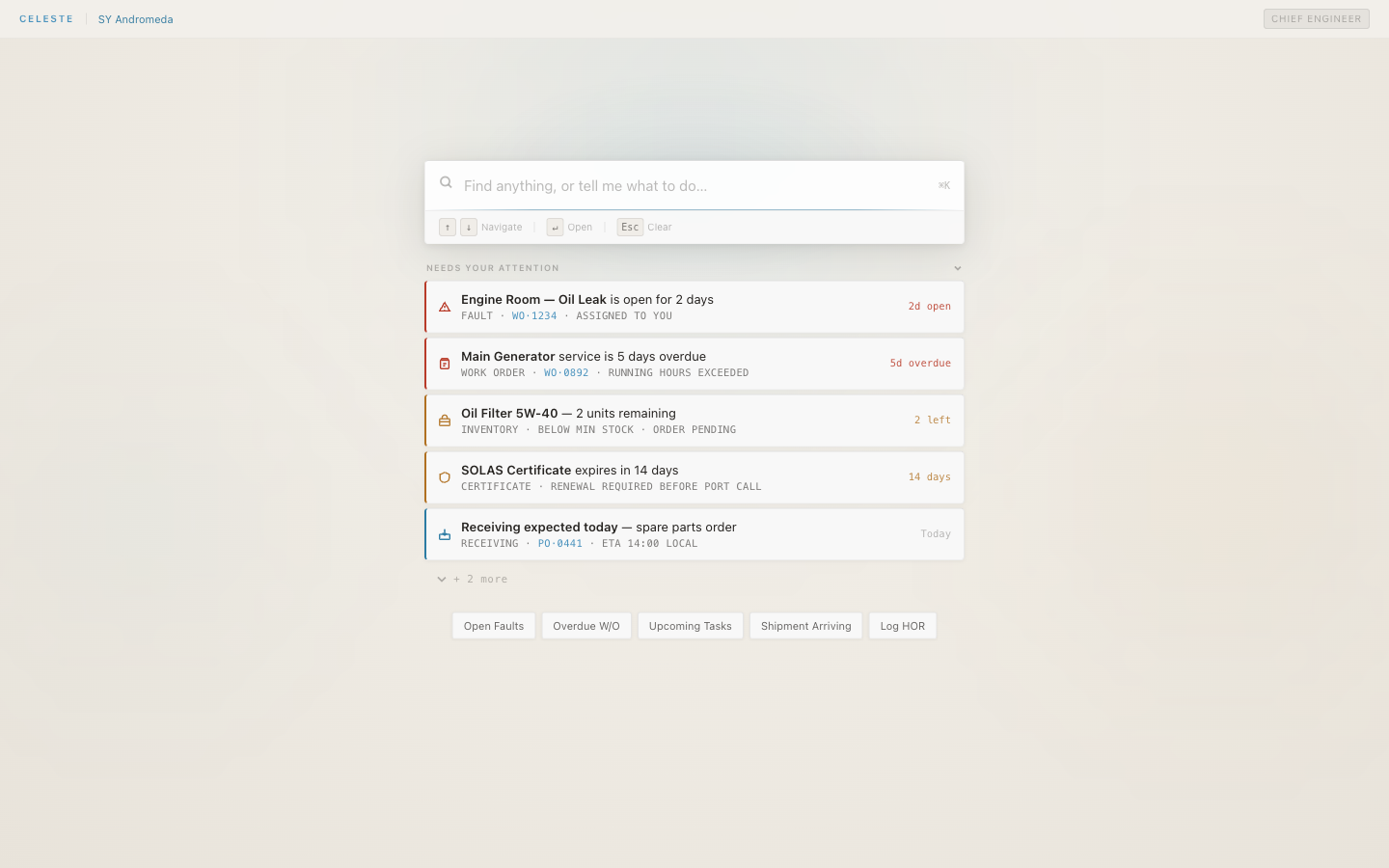
That is the change a tool like CelesteOS is built around, and it is worth being precise about it. It offers natural-language search across the vessel's records and manuals: you type what you'd ask a colleague, and results open the source record itself, scoped to your vessel and role. Your existing manuals, PDFs, scans, exports, and emails are indexed as they are — no reformatting exercise, nothing held hostage. It runs alongside your existing planned-maintenance system, with nothing to replace and nothing to migrate. The judgement stays with the engineer; what moves to the vessel is the record.
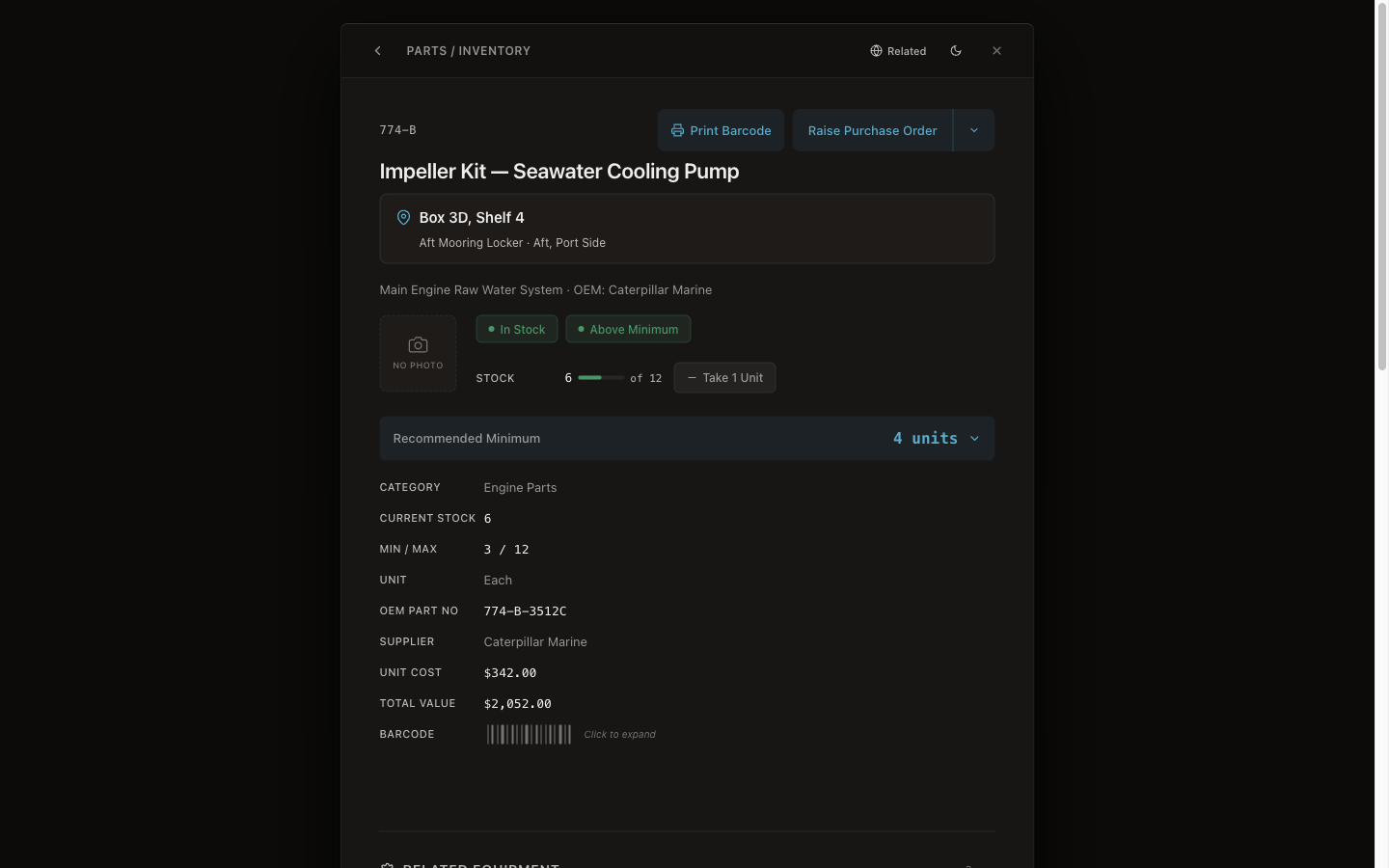
One concrete example of the difference: the parts tab in a spreadsheet is a cell you hope is current. The same information as a live record carries the part's physical location on board, stock against its minimum, the supplier, and a way to raise the purchase order from the same place you found it.
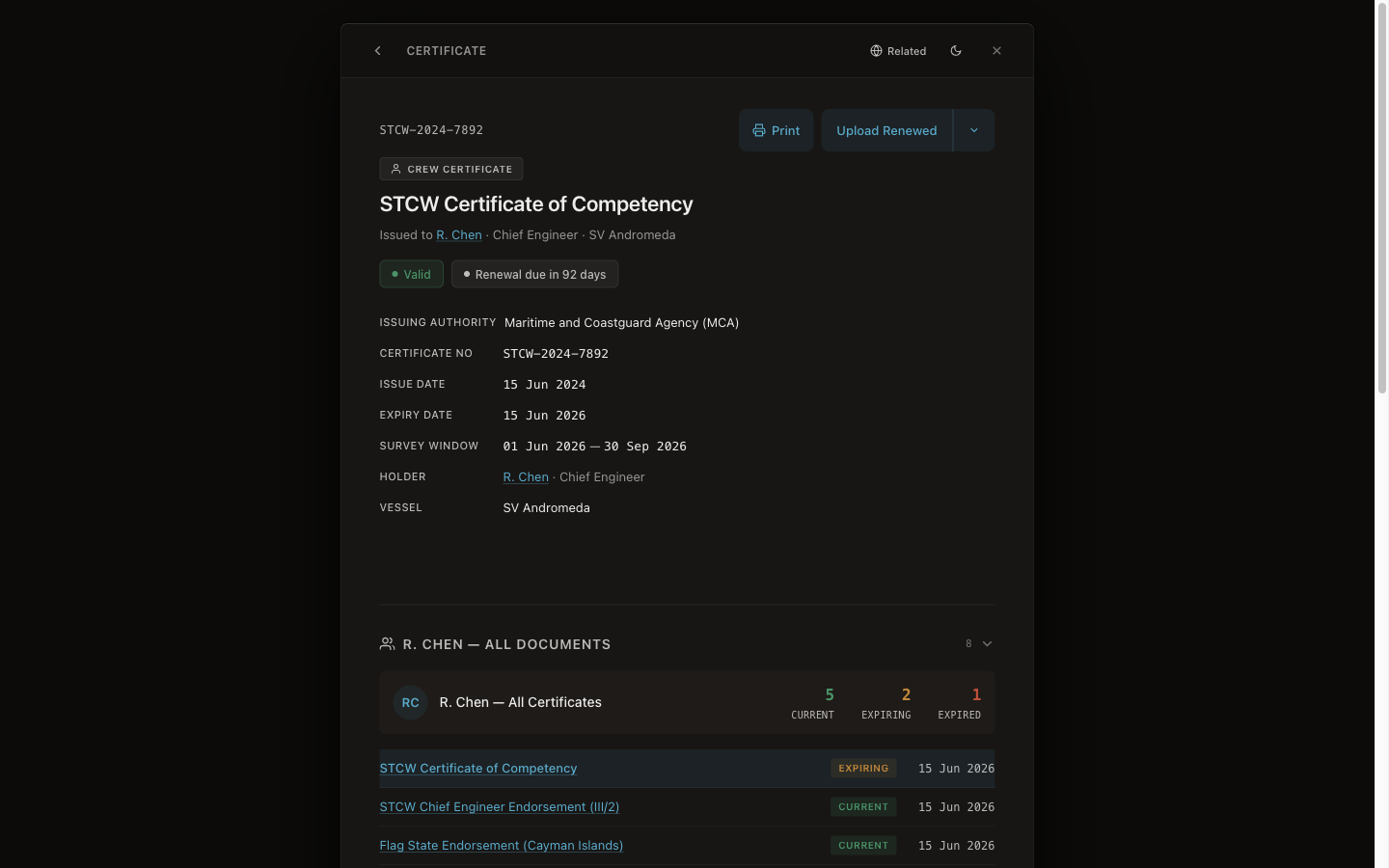
And the certificates tab — a date you have to remember to look at — becomes a record that surfaces the expiry before it surprises you on inspection day, with the source PDF attached to it. None of this is a reason to abandon a working spreadsheet today. It is what the spreadsheet was reaching for, once one vessel becomes two engineers, or two vessels.
There is one more property worth naming for the engineer who has been burned by a forked file. When a record can be overwritten and re-saved, it cannot serve as proof of what was actually done. A record that is append-only — attributed and timestamped, with corrections logged as new entries rather than edits — is the difference between a log and evidence. The ISM Code requires vessels to keep records of maintenance activity [3]; what it does not require is that those records be searchable, connected, or transferable to the next crew — which is precisely where a spreadsheet runs out. You do not get evidence-grade records from a shared spreadsheet, no matter how disciplined the crew.
Frequently asked questions
Is a spreadsheet good enough for a yacht maintenance log?
For a single vessel with one engineer who knows it well, yes — it is free, needs no training, and opens at anchor with no connection. The structure above will carry you a long way. The limit appears when more than one person edits the file, a second vessel joins, or a survey forces you to reconcile several versions of the same sheet. That is the threshold to plan for, not a flaw in starting with a spreadsheet.
What columns should a yacht maintenance log include?
Build five linked tabs: an equipment register keyed by a stable Equipment ID; a planned-maintenance schedule with intervals and next-due dates; a work and fault log with a full "what was found / what was done" narrative; a parts and inventory tab with location and minimum stock; and a certificates tab with expiry dates and file references. The Equipment ID linking every tab is what makes a year of history filterable in seconds.
Where do maintenance spreadsheets usually fail?
In four predictable ways: the narrative column nobody fills on a busy day; the file that forks into several edited copies with no single source of truth; the knowledge that leaves when the engineer who built the sheet rotates off; and search that finds only what you typed, not what you meant, with nothing connecting a fault to its work order, parts, and manual.
How do I move from a spreadsheet to a planned-maintenance system without losing my data?
You do not have to reformat first. Your existing manuals, PDFs, scans, exports, and emails are indexed as they are, and the system runs alongside an existing planned-maintenance system — nothing to replace, nothing to migrate. The aim is to keep the record with the vessel rather than the laptop, so it survives the next crew change. Your data stays yours.
Summary
- A spreadsheet is the correct first maintenance log — free, no training, under your control. Start there.
- Build five linked tabs (equipment, schedule, work/fault log, parts, certificates), keyed by a stable Equipment ID, with the "what was done" narrative written in full.
- A spreadsheet breaks predictably: the unfilled narrative column, the forked file, the knowledge that leaves with the engineer, and search that finds only what you typed.
- The upgrade is not "a bigger spreadsheet" but a record that belongs to the vessel — captured as you work, connected, searchable in plain language, and append-only.
- It runs alongside your existing system; your manuals and exports are indexed as they are, and your data stays yours.
CelesteOS keeps a vessel's maintenance record with the vessel — searchable in plain language and connected across faults, work orders, parts, and certificates — so the knowledge does not leave on the next flight home. Records are independently verifiable at verifier.celeste7.ai. You can also search the vessel's records and manuals in plain language. Learn about the pilot.
[1] Seahub, "Superyacht Engineering Handover: Good, Bad or Essential?" — seahubsoftware.com
[2] Hill Robinson, "Addressing the crew skills shortage in the superyacht industry" — hillrobinson.com
[3] IMO, International Safety Management (ISM) Code, Section 10 (maintenance of the ship and equipment) — marineinsight.com